
Summarise With AI


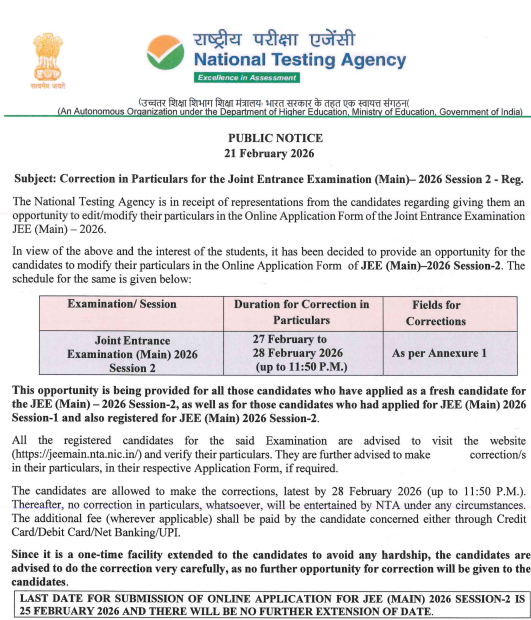
The National Testing Agency (NTA) has announced the JEE Main Correction Window 2026 session 2 dates along with the official brochure. As per the schedule, the JEE Main Session 2 correction window is going to be opened on February 27, 2026. And lasts till February 28, 2026 (11:30 P.M.)
If any students appeared in Session 1 and are now registered for Session 2, they can access the JEE Main application form correction window on the official website, jeemain.nta.nic.in. Read the full blog to know more about the JEE Main correction window, how to make corrections in the JEE Main application form, and the editable and non-editable sections.
What is JEE Main Correction Window?
The JEE Main Correction Window offers applicants an opportunity to amend or rectify information on their Joint Entrance Exam Main (JEE Main) Application Form via the JEE correction window after having submitted an application.
The JEE Mains 2026 correction window will be open for a short duration after each session (1 & 2) has closed. It is created to assist students in correcting their form-filling errors and, therefore, preventing issues related to students being disqualified from the exam (unqualified to take the exam) or not being able to properly issue an admit card.
Last Minute Tips for JEE Mains 2026 April Session
Consistent practice is essential to prepare effectively for JEE Main Session 2. The best way to improve your JEE Main score is to take mock tests regularly. To give your prep a final finish, attempt several full-length JEE Main mock tests in exam-simulating conditions; this will help you improve on accurate time management and perform better at your exam.
Solve each of the previous years’ JEE Main tests by using these tests as mock tests in order to understand the current JEE Main Exam format and to be familiar with the current JEE Main Exam difficulty level.
Practice JEE Main Mock Tests Now
Why is the JEE Main Correction Window Important?
After the registration, the JEE Mains correction window is very significant for those who have made mistakes in the application form.
- To provide an opportunity to students, applications are rejected due to incorrectly entered information
- To Ensure Correct Information is on the Student’s Admit Card and on the Student’s Score Card.
- To make it possible to change students’ category, gender, or exam paper selection in those cases where it was incorrectly applied.
- To alleviate stress from Small Errors in the Student’s Application Form
- To give students a 2nd chance to upload acceptable images and documents.
JEE Main Correction Window 2026 Session 2 Dates
The National Testing Agency has established a two-day JEE Main Session 2 Correction Window 2026 period to allow candidates to double-check their required information and make any modifications.
| Events | Dates |
|---|---|
| JEE Main 2026 registration last date for session 2 | Feb 25, 2026 |
| Form correction window | Feb 27 to 28, 2026 |
| JEE Mains 2026 session 2 city slip release | Second Week of March 2026 |
| JEE Main April admit card release date | 3 to 4 days before the date of the exam |
| JEE Main April 2026 exam date | April 2 to 9 |
Who can use JEE Main Correction Window?
The JEE Mains 2026 correction window is open to both new and previous JEE Main 2026 applicants. Candidates can use the correction window to change specific fields in their application forms, such as course/paper selection, question paper media, state code of eligibility, examination cities, educational qualifications, gender, category, and fee payment. New candidates who have just applied for Session 2 will have limited options to change their information, such as their name, father’s name, or mother’s name.
JEE Main 2026 Correction Window Link
The JEE Main Correction Window 2025 session 2 was made available on the official website, jeemain.nta.nic.in. To access, registered students are required to log in using their application number and DOB. The direct link to access the JEE Main Session 2 Correction window is attached below.
Direct link to access JEE Mains 2026 Correction Window
How to JEE Mains Correction Window 2026 Session 2?
The following is a step-by-step process to complete the correction procedure for the JEE Main application form:
Step 1: Navigate to the official JEE Main webpage on the NTA website.
Step 2: Click on the link “Application Form Correction” under JEE Main on the website.
Step 3: From the JEE Main homepage, choose the link “JEE Main Application Form Correction”.
Step 4: Enter your Application No., Password (or Date of Birth), as well as the Security Pin, and click on “Sign in” to log into your Account.
Step 5: Read the guidelines carefully before moving forward with any changes; the only fields that can be edited on the application form are those specifically designated to allow for changes.
Step 6: Double-check to make sure that the revised information provided by you is complete and accurate; specifically, make sure that your names are spelled correctly and that your numbers, as well as the correct selections of options, are
Step 7: If you are making any changes to the application fee(s) (such as changing your category or adding a second paper to the application), be prepared to pay the additional application fee(s) associated with those changes. You will be able to make those payments on the web via debit card/credit card/net banking/UPI.
Step 8: When you have completed making corrections to your application, you should press “Submit” on the Application Page to verify that the corrections have been made.
Step 9: After the correction(s) has been submitted, download and save a copy of your Confirmation Page.
Editable Sections in JEE Main Correction Window
The following details are generally allowed to be modified using the JEE Mains correction window.
| Section | Editable Fields in JEE Main Application Form |
|---|---|
| 1. Personal Details (Limited Changes Allowed) | Candidate’s Name |
| Father’s Name / Mother’s Name | |
| Date of Birth | |
| Gender | |
| Category (General/OBC/SC/ST/EWS) | |
| PwD Status | |
| 2. Academic Details | Class 10 Board Name & Passing Year |
| Class 12 Board Name & Passing Year | |
| Marks / Result Status | |
| School/College Name | |
| 3. Examination Details | Paper Selection (Paper 1 / 2A / 2B) |
| Medium of Examination | |
| Exam City Preference | |
| 4. Uploaded Documents | Photograph |
| Signature | |
| Category Certificate | |
| PwD Certificate | |
| 5. Additional Fee Payment (If Required) | An additional fee must be paid online if changes affect fee (e.g., category or paper change) |
Non-Editable Sections in JEE Mains 2026 Correction Window
The following details are usually NOT allowed to be changed once the form is submitted:
| Category | Non-Editable in JEE Main Application Form |
|---|---|
| Non-Editable Fields | Mobile Number |
| Email Address | |
| Permanent Address | |
| Present Address | |
| Emergency Contact Details | |
| Live / Uploaded Photograph | |
| Limited Change (Only ONE Field Allowed) | Candidate Name OR Father’s Name OR Mother’s Name |
JEE Main Application Correction Fee
Typically, there are no extra fees required for correction or modifications of information during JEE Main Application Correction, provided that a candidate logs in and corrects an error through the online correction window within the specified period.
Candidates can make corrections, as long as the corrections do not affect the original application fee. It should be noted that additional fees incurred as a result of changing from the reserved to the General/OBC-NCL category, or adding papers, etc., will require payment through any of the payment methods specified in the application form (debit/credit card, net banking, or UPI).
If no fees are to be charged for upcoming changes, then no additional payment will need to be made by the candidate for any corrections.
Conclusion
The JEE Mains Correction Window is crucial to make the adjustment of information errors or verify that the submitted data is appropriately recorded by the testing body. Hence, Common students should continuously monitor the updates and announcements by the NTA (National Testing Agency) for submission of corrections made before the deadline to avoid complications at the last moment.
Frequently Asked Questions
Q1. What details can be changed in the JEE Main Correction window?
According to NTA norms, candidates can make modifications to certain fields, such as personal details (limited changes), academic details, exam city preference, paper selection, category, gender, and uploaded documents such as photographs and signatures.
Q2. What details cannot be modified on the JEE Main 2026 application form?
Mobile number, email address, permanent address, present address, and emergency contact information are typically non-editable after submitting the application form.
Q3. How to use a correction window?
To use a JEE Main correction window session, log in to the official portal using your credentials between the mentioned dates. Click the “Correction in JEE Main Application Form” link, modify allowed fields (such as personal, academic, or document details), then review, submit, and download the updated confirmation page.
Q4. Is jee mains application correction window 2026 necessary?
The JEE Main Application Form Correction Window helps candidates correct flaws in personal or academic information. It prevents application rejection due to wrong information. The JEE Main Correction window provides candidates with a final opportunity to confirm accuracy before the test procedure begins.